Download Artemisia
All operating systems
- Download the latest the released archive for your operating system: https://codeberg.org/korpling/artemisia/releases
- Extract the contents of the archive file to a location of your choice. The archive contains an executable file.
- Double click on the executable file to run it.
Only on macOS
The application is not signed and thus you have to do some additional steps on macOS:
- Move the
artemisiaexecutable file to theApplicationsfolder (do not skip this step!)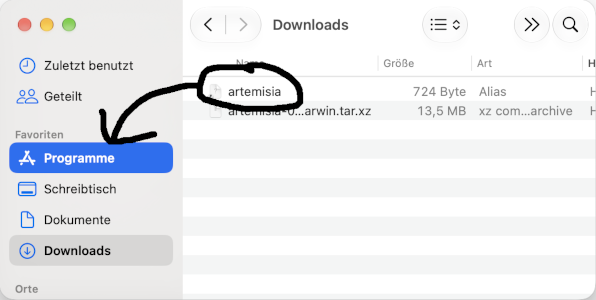
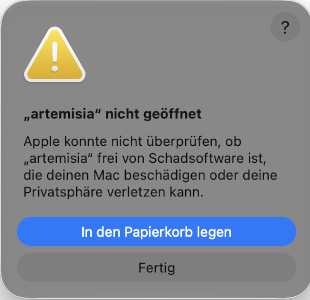
- Run
artemisiaby double clicking on it - A dialog will appear that asks you to put it into the trash, do not click on that button but the other one.
- Go to the system settings on “Data protection and security” and unblock the app
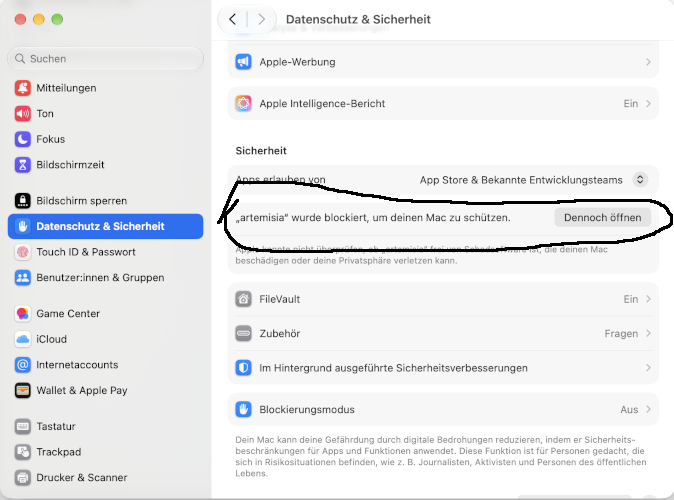
- Confirm unlocking the app in the next dialog
After these steps you should be able to execute the app directly from the Applications folder.